Three Oak Woods
No monitoring company required

Your family, one press away.

OakLink is a family-managed alert system in development — with no required monitoring subscription — that helps the people you love stay independent at home, and helps you breathe a little easier.

Not yet available for sale. No app needed by the person pressing the button. Cellular service may have a separate cost.

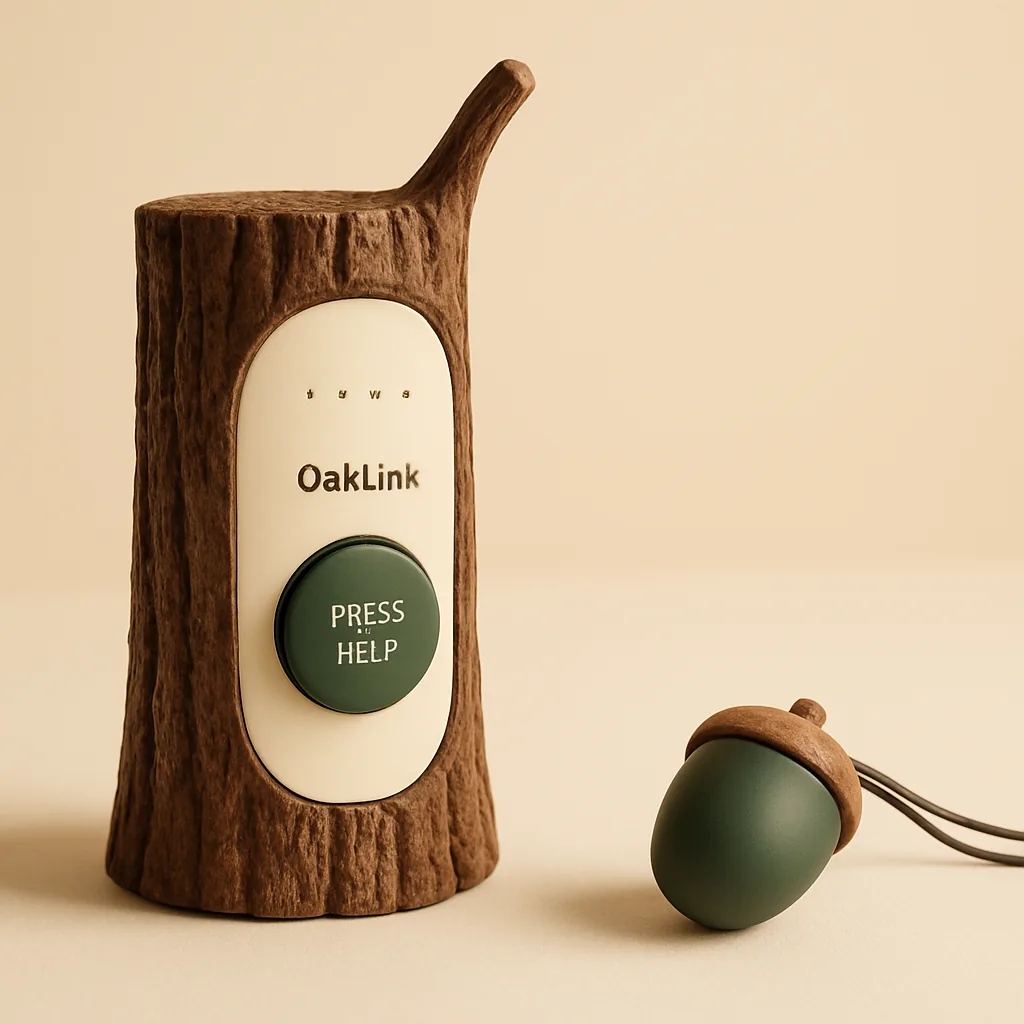
The OakLink acorn pendant resting beside the oak stump base station hub

Acorn Pendant + Oak Stump Base

Designed to belong in the home

Concept rendering — in development

For the whole family

Independence for them. Reassurance for you.

Helping an aging parent stay safe at home shouldn't mean constant worry. OakLink keeps you gently in the loop, without taking away the independence they cherish.

Family alerts, designed to be quick

The prototype sends text messages and optional app notifications to configured contacts. Delivery time varies with connectivity and messaging services.

Quiet device health checks

The prototype reports device check-ins and selected power and connection conditions. These checks do not prove that every alert will reach a caregiver.

Battery alerts in testing

Battery reporting and warning logic are implemented. Calibration, warning thresholds, and usable battery life still need testing before we can promise warning times or charging intervals.

No app needed to press for help

OakLink is designed so the person pressing the button does not need to learn a complicated app. Families may use a simple setup path to add, remove, and reorder trusted contacts, configure the base unit, and test alerts.

No required monitoring subscription

OakLink is planned as a hardware purchase with no required monitoring fee. Cellular service details are in the FAQ below.

OakLink

One integrated system

The OakLink family.

Four planned pieces with a shared design language. We are testing the core electronics; materials, enclosures, and the complete family are still in development.

OakLink is still in development. Every product image on this page is a concept rendering — the final hardware may look different.

Acorn Pendant
Worn

Acorn Pendant

A light, lovely wearable with a single help button. Worn with pride, not reluctance.

Oak Stump Base Station
Connected

Oak Stump Base Station

The heart of the system. A beautiful hub that keeps everything linked behind the scenes.

Charging Nest
Charged

Charging Nest

A magnetic cradle designed to make powering up as simple as setting the pendant down. Still in design.

Wall Help Button
Placed

Wall Help Button

A planned large, easy-press button. Final placement guidance depends on enclosure and water-resistance testing.

OakLink Pendant

Pendant

Worn with pride, not reluctance.

The acorn-shaped pendant is designed to be light, comfortable, and lovely to look at. A single press calls for help — no screens, no confusion.

Concept rendering — in development

OakLink Base Station

Base Station

A quiet anchor for the home.

Inspired by an oak stump, the base station blends into the living room and keeps everything connected behind the scenes.

Concept rendering — in development

OakLink Charging Nest

Charging Nest

Effortless docking, every night.

Designed to be magnetic and forgiving, so powering up is as simple as setting the pendant down. The nest is still in design. Final enclosures and the complete product family remain to be validated.

Concept rendering — still in design

OakLink Wall Button

Wall Button

Help within reach, where it matters.

A planned large, easy-press button to keep help within reach. Suitable placement, including any bathroom use, still needs enclosure testing.

Concept rendering — in development

How it works

Three simple steps to peace of mind.

01

Press

Press the help button to start an alert. The pendant electronics are being tested; final button designs are still in development.

02

Connect

OakLink is designed to reach your family by text message over the base unit's cellular connection — with optional internet notifications over home Wi-Fi. Delivery depends on power, connectivity, and messaging services.

03

Respond

A contact who receives the alert can acknowledge it and check in. Your family decides who will respond and how to get help.

Questions, answered

How it actually works.

OakLink is designed to stay simple and clear. Here's what we can share about how it's being built, in plain language.

Will OakLink require a monthly fee?
There's no required OakLink monitoring fee. We built this as a family-managed alert system, not a traditional monthly monitoring service — your family handles the alerts, not a call center. The one thing to know: the base unit needs a cellular connection to reach your family, and that part may need a separate prepaid SIM, cellular subscription, or IoT connectivity plan from an outside provider. Those plans and prices aren't ours to set, so they can change.
Does OakLink require an app?
The person pressing the button does not need an app. Caregivers can receive and acknowledge text messages using their normal messaging app. Optional internet notifications currently use the ntfy app, which caregivers must install and configure.
How will the contact list work?
Families can set up a list of trusted contacts, choose the order they're notified in, and update that list whenever things change — through the prototype setup page. We are still testing the setup experience with families.
Will OakLink use cellular or Wi-Fi?
The prototype uses cellular text messages and optional internet notifications over home Wi-Fi. Cellular messaging does not need home internet, but does need working cellular service. In an August 2026 bench test, an internet acknowledgment succeeded while text messages were failing; three further app acknowledgment rounds passed in September. These are two useful paths, but both depend on the base unit and power, and neither guarantees delivery. Coverage, internet access, and outside messaging services can affect alerts. See the fee question above for connectivity costs.
What if an acknowledgment fails?
The prototype sends follow-up reminders for unanswered alerts, subject to power, connectivity, and message limits. If the app reports a failed acknowledgment, wait and try again while the alert is still open, or use the text-message reply path. Look for the separate Acknowledged confirmation. A sent message or successful tap alone does not prove that someone has provided help.
Will OakLink include a SIM card?
That's the plan — to ship the base unit with a compatible SIM already in place, so a tested cellular option is ready to go if you choose to activate it. As with anything still in development, the final packaging could shift.
Does OakLink work without an activated base unit?
The buttons themselves are simple — but for family alerts to actually go out, the base unit needs to be set up and connected. We'll make that setup as easy as we can.
Is it waterproof for the bathroom?
Water resistance is a design goal, not a verified capability. We have not established an IP rating or approved shower, bath, or wet-area use for the prototype. Placement guidance will depend on testing the final enclosure.
Does it call 911 automatically?
No. OakLink reaches your family, not emergency services — it isn't a substitute for calling 911, emergency medical care, professional monitoring, or in-person supervision. See the Important Product Note for the full details.

Why we are building OakLink

Safety that feels like care, not equipment.

No required monitoring subscription

The plan is to sell the hardware outright. No required monitoring subscription stands between you and your family.

Simple

A wall button and a wearable pendant — a familiar pair with nothing complicated to learn.

Reliability-focused

Device check-ins and selected fault reports help families notice problems. Longer reliability and power-recovery testing is still ahead.

Beautiful

A safety product designed to belong in the home.

A calm, sunlit living room

Technology should feel like home.

Three Oak Woods creates products that support independence while keeping families connected. OakLink combines thoughtful industrial design with thoughtful family-alert technology.

Designed in Colorado by Three Oak Woods.

We're a small team that believes the things we rely on most should be the most thoughtfully made. OakLink is designed to be beautiful, dependable, and genuinely kind to the families who live with it.

Why we're building OakLink

Built from real family moments.

I've always been the tech support person in my family.

When my uncle called because the alert button he bought online wasn't working, I wondered whether I could build something better. IoT projects are a hobby, and software has been my career, so the problem felt close enough to solve and personal enough to matter.

My mom had a Life Alert device, but she stopped carrying it. I'm not sure all the reasons why, but it looked clinical, and she struggled to use it with confidence.

My wife's mom could have used something simple, too. A wall-mounted button near the tub might have helped her contact a caregiver when she couldn't get out on her own.

OakLink started from those moments.

We're building it for families who want safety without making home feel like a hospital. A simple press. A familiar object. A calmer way to stay connected.

Because when someone you love needs help, technology should be the easiest part of the experience.

Important Product Note

OakLink is currently in development. Product appearance, features, pricing, and availability may change. OakLink is a family alert system and is not a substitute for calling 911, emergency medical care, professional monitoring, or in-person supervision.

In development

Be first to know when OakLink launches.

We're building OakLink for families who want safety without sacrificing independence.

By joining, you agree to our Privacy Policy. Joining the waitlist doesn't guarantee access, pricing, or availability. See the Important Product Note above.

Please don't send medical details, diagnoses, emergency events, or other sensitive personal information through this form.